
Learn how a food analyzer app can scan ingredients and nutrition labels, what it can tell you, and what to check before trusting its results.
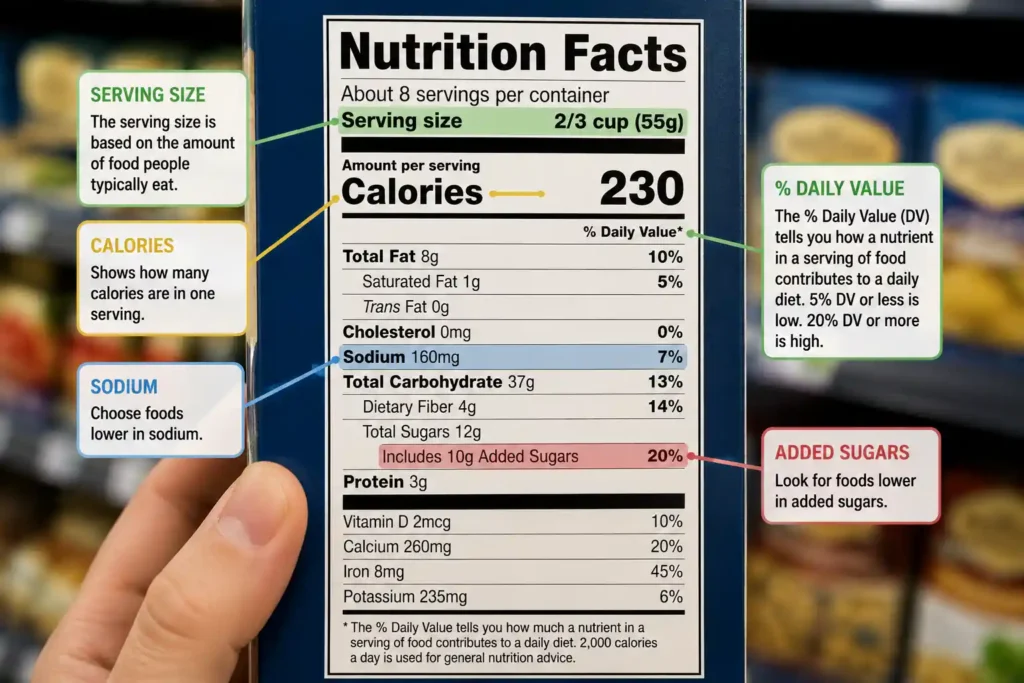
Walking through a grocery store can make healthy eating feel harder than it should. One package may say “natural,” another may say “high protein,” and another may highlight “no added sugar.” But those front-of-package claims do not tell you everything you need to know.
A food analyzer app can make the process easier by helping you examine an ingredient list, Nutrition Facts label, or food information in one place. Depending on the app, you may be able to scan a barcode, photograph a label, search a food database, or track nutrients.
But an app is only a tool. Its result should not replace reading the actual label or using reliable nutrition information.
Quick Answer: What Is a Food Analyzer App?
A food analyzer app is a smartphone application that helps you examine food information such as ingredients, calories, nutrients, serving sizes, allergens, or dietary preferences.
Some apps allow you to scan a barcode or photograph a food label and then provide a simplified explanation of the information. Features vary widely between apps, so you should check what data sources, scanning methods, privacy practices, and nutrition criteria an app uses before relying on its results.
For the most reliable information, compare an app’s results with the Nutrition Facts label and ingredient list on the actual product package. The FDA explains that U.S. packaged foods provide important information about serving size, calories, nutrients, % Daily Value, and ingredients
Want an Easier Way to Analyze Your Food?
See how this food analyzer tool works, explore its features, and decide whether it fits your nutrition goals.
👉 Check the Food Analyzer Tool
What Is a Food Analyzer App?
A food analyzer app is designed to help you understand food information without requiring you to manually interpret every part of a package.
Depending on the app, you may be able to scan a barcode, take a picture of a food label, search for a product, or enter a food manually.
The app may then display information such as:
- Calories
- Protein
- Total carbohydrates
- Dietary fiber
- Total fat
- Saturated fat
- Sodium
- Added sugars
- Ingredients
- Allergens
- Dietary preferences
- Serving information
Some newer apps also use image recognition or AI-based analysis to interpret food labels or meals. Current consumer apps advertise features such as ingredient breakdowns, nutrition explanations, personalized dietary insights, and food-label scanning.
Simple example
Imagine you are comparing two breakfast cereals.
Instead of looking only at the large “high protein” or “whole grain” message on the front, you could use an analyzer to organize the nutrition and ingredient information.
You can then return to the actual package and compare:
- Serving size
- Calories
- Protein
- Fiber
- Added sugars
- Sodium
- Ingredient order
Actionable takeaway: Use the app to make label information easier to understand, not to replace the label itself.
How Does a Food Analyzer App Work?
The exact process depends on the application.
A typical food scanner may work like this:
Step 1: Scan the product
You may scan a barcode or photograph the ingredient list and Nutrition Facts label.
Step 2: Match the food
The app may search its own product database or use information from another food database.
Step 3: Analyze the information
The application may organize calories, nutrients, ingredients, or other information into an easier-to-read format.
Step 4: Present the results
Some apps provide scores, warnings, dietary categories, or personalized explanations.
Step 5: Compare the result with the package
This final step is important.
If the information in the app does not match the product you have in your hand, use the current package label as an important reference and investigate why the information differs.
Food products can change their formulations, serving sizes, or packaging.
What Can a Food Analyzer App Check?
The features vary by application, but several types of information are commonly useful.
1. Ingredients
An ingredient checker may help you understand unfamiliar terms appearing on a package.
In the United States, ingredients generally appear in descending order of predominance by weight, although there are specific labeling rules and exemptions.
This means the ingredient list can provide useful context when comparing similar products.
2. Calories
Calories indicate the amount of energy provided by a food.
However, calories should always be considered together with serving size. The FDA notes that calorie information on the Nutrition Facts label is generally based on one serving, and a package may contain more than one serving.
3. Protein
Protein can be useful when comparing foods and planning meals.
An analyzer can make protein amounts easier to compare, but your individual protein needs depend on factors such as your overall diet, age, activity level, and health situation.
4. Dietary Fiber
Fiber is another useful part of a Nutrition Facts label.
Comparing fiber content can help you understand differences between similar packaged foods.
5. Added Sugars
Added sugar is specifically listed on the U.S. Nutrition Facts label.
The FDA notes that % Daily Value can help consumers understand whether a nutrient is relatively low or high per serving. As a general guide, 5% DV or less is considered low and 20% DV or more is considered high.
6. Sodium
Sodium is another nutrient many consumers compare when choosing packaged foods.
An app may make comparisons easier, but you should still check the actual Nutrition Facts label.
7. Serving Size
This is one of the most important details to check.
A product may appear low in calories or sugar until you realize that the package contains several servings.
The FDA specifically recommends starting with serving size and servings per container when reading the Nutrition Facts label.
Food Analyzer App vs. Nutrition Facts Label
A food analyzer app and the original food label serve different purposes.
| Feature | Food Analyzer App | Nutrition Facts Label |
|---|---|---|
| Convenient comparison | Usually yes | Requires manual comparison |
| Ingredient information | Often available | Yes |
| Calories | Usually available | Yes |
| Serving size | Usually available | Yes |
| Added sugars | Often available | Yes |
| % Daily Value | Often available | Yes |
| Product-specific information | Depends on database | Printed on package |
| Personalized interpretation | Some apps offer it | No |
| Requires smartphone | Yes | No |
The key point is simple:
An app can make information easier to interpret, while the package label gives you product-specific information you can verify directly.
How to Read a Food Label Yourself
Even if you use a food analyzer app, learning the basics of food labels is valuable.
Start with serving size
Look at:
- Serving size
- Servings per container
The serving size is not a recommendation for how much you should eat. It is a standardized reference used for the nutrition information on the label.
Check calories
Look at calories per serving.
Then consider how much you actually plan to eat.
If you eat two servings, you generally consume twice the calories and nutrients listed for one serving.
Check nutrients you want more or less of
Depending on your individual dietary needs, you may pay attention to:
- Fiber
- Protein
- Calcium
- Iron
- Potassium
- Saturated fat
- Sodium
- Added sugars
The FDA recommends using the Nutrition Facts label to help choose foods with more nutrients you want and less of nutrients you may want to limit.
Read the ingredient list
Don’t rely only on a health claim printed on the front of the package.
Turn the package around and read the ingredient list.
Ingredients are generally listed from greater to smaller amounts by weight, subject to applicable labeling rules.
What Should You Look for in a Food Analyzer App?
Not all food analyzer apps are the same.
Before choosing one, look for the following.
Reliable data sources
Find out where the app gets its nutrition and ingredient information.
For example, USDA FoodData Central is a comprehensive source of food composition data and includes multiple food-data types.
That does not mean every app using a USDA database is automatically accurate. You still need to understand how the app uses and updates its data.
Clear explanations
A good app should explain information in plain language rather than simply producing a scary-looking score.
Current product information
Packaged foods can change.
Look for evidence that the app updates its product database.
Serving-size clarity
The app should make it easy to see whether nutrition information applies to one serving or the entire package.
Privacy information
If the app asks you to enter:
- Allergies
- Health goals
- Dietary preferences
- Food photos
- Personal information
review its privacy policy before using it.
Transparent scoring
If an app gives a product a “health score,” find out how that score is calculated.
A single number can be convenient, but it can also hide important details.
Can a Food Analyzer App Tell You If a Food Is Healthy?
Not perfectly.
“Healthy” is not a single number that applies equally to everyone.
A food’s usefulness in your diet can depend on:
- Your overall eating pattern
- Portion size
- Your nutritional needs
- Dietary preferences
- Allergies
- Health conditions
- The other foods you eat
For example, a food that is relatively high in sodium may not be an ideal everyday choice for someone who has been advised to limit sodium. Another person may have completely different dietary considerations.
Therefore, treat an app’s score as one piece of information, not a medical judgment.
Are Food Analyzer Apps Accurate?
They can be useful, but accuracy depends on the quality and freshness of the underlying information and how the app processes it.
A barcode scanner may identify the correct product but still show outdated information if the database has not been updated.
A photo-based analyzer may also misread text or incorrectly identify part of a food label.
This is particularly important when you have an allergy or a medically necessary dietary restriction.
A simple verification method
When something matters, use this process:
App result → Product package → Ingredient list → Nutrition Facts → Reliable health source
If the information conflicts, don’t automatically assume the app is correct.
Common Mistakes When Using Food Scanner Apps
Mistake #1: Trusting the score without understanding it
A score is convenient, but you should know what factors created it.
Mistake #2: Ignoring serving size
A product may look low in calories per serving while the package contains multiple servings.
Mistake #3: Looking only at calories
Calories are important, but they do not describe every nutritional characteristic of a food.
Mistake #4: Assuming unfamiliar ingredients are dangerous
An unfamiliar ingredient name does not automatically mean that the ingredient is unsafe.
The FDA explains that food ingredients must meet applicable safety standards regardless of whether they are naturally or artificially derived.
Mistake #5: Treating an app as a doctor or dietitian
A food scanner is a consumer tool.
It should not diagnose a medical condition or replace individualized medical advice.
Mistake #6: Forgetting that products change
A formulation can change even when the package looks similar.
Check the current label when accuracy matters.
Who May Find a Food Analyzer App Useful?
A food analyzer app may be useful for people who want a faster way to organize food information.
Busy shoppers
If you regularly compare several products, scanning can save time.
People learning to read labels
A good app can provide explanations while you learn how to interpret Nutrition Facts labels.
People tracking nutrients
If you’re monitoring calories, protein, fiber, sodium, or other nutrients, an analyzer may simplify the process.
People comparing products
You can use an app to compare similar products before making a purchase.
People following dietary preferences
Some apps allow users to filter or evaluate foods according to preferences such as vegetarian or vegan diets. Features vary by app.
When Should You Be More Careful?
Extra caution is appropriate when food choices are connected to a medical condition, allergy, pregnancy, medication, or medically prescribed diet.
For example, if you have a serious food allergy, do not rely only on an app’s scan or score.
Read the current package information and follow the advice of your healthcare professional.
The same principle applies to medically restricted diets.
Practical rule: The more serious the consequence of an incorrect result, the more important it is to verify the information independently.
How to Choose a Food Analyzer App
Before downloading an app, ask these questions:
| Question | Why It Matters |
|---|---|
| Where does the nutrition data come from? | Helps you judge data quality |
| How often is the database updated? | Products and formulations can change |
| Can I see the original nutrition information? | Makes verification easier |
| Does it show serving size clearly? | Prevents misleading comparisons |
| How does its health score work? | Helps you understand recommendations |
| Does it explain ingredients? | More useful than a simple score |
| What personal information does it collect? | Important for privacy |
| Does it support my dietary needs? | Features vary between apps |
| Can I manually correct information? | Helpful when scans are wrong |
Is a Food Analyzer App Worth Using?
For many people, yes—as a convenience tool.
A good app can make food labels easier to organize, compare, and understand. It can be especially useful when you’re shopping and want to quickly compare several similar products.
But don’t confuse convenience with authority.
The best approach is:
Use the app for convenience.
Use the package label for verification.
Use trusted health and government resources for broader nutrition guidance.
Use a healthcare professional for individualized medical advice.
Conclusion
A food analyzer app can make grocery shopping and nutrition tracking easier by organizing information about ingredients, calories, nutrients, serving sizes, and other food-label details.
The most useful apps are not necessarily the ones with the most dramatic health scores. Look for transparent data sources, clear explanations, current information, serving-size details, useful comparison features, and reasonable privacy practices.
Most importantly, use an app as a decision-support tool rather than a final authority.
For U.S. packaged foods, the Nutrition Facts label and ingredient list remain important sources of product-specific information. The FDA provides consumer guidance on understanding serving sizes, calories, % Daily Value, added sugars, and other parts of the label.
If you’re looking for broader nutrition data, USDA FoodData Central is another useful reference for food-composition information.
Frequently Asked Questions
What is a food analyzer app?
A food analyzer app is a smartphone tool that helps users examine food information such as ingredients, calories, nutrients, serving sizes, or dietary characteristics.
How does a food scanner app work?
Depending on the app, you may scan a barcode, photograph a food label, search a database, or manually enter food information. The app then presents available nutrition or ingredient information.
Can a food analyzer app scan ingredients?
Some apps can scan or photograph ingredient lists and provide an analysis or explanation. The exact feature set varies by application.
Can a food analyzer app tell me if food is healthy?
It can provide information or a scoring system, but no single app score can determine whether a food is universally healthy for every person.
Are food analyzer apps accurate?
Accuracy varies. It depends on the quality and freshness of the database and the technology used by the app. When information matters, compare the result with the current product label.
Can I use a food analyzer app for weight management?
Some apps can help you monitor calories, nutrients, ingredients, or food choices. However, an app should support your overall approach rather than promise a specific weight-loss result.
What should I check first on a food label?
Start with the serving size and servings per container. Then review calories, nutrients, % Daily Value, and the ingredient list.
What is the difference between a food analyzer and a calorie tracker?
A calorie tracker generally focuses on recording food intake and calorie totals. A food analyzer may provide additional information about ingredients, nutrition labels, dietary preferences, or product characteristics.
Can a food analyzer detect allergens?
Some apps offer allergen-related features, but you should never rely solely on an app for a serious food allergy. Always check the current product packaging and follow professional guidance.
Does the USDA have food nutrition information?
Yes. USDA FoodData Central provides food-composition data across several data types and can be used to research nutrition information for foods.
What is the best food analyzer app?
There is no single best app for everyone. Compare data sources, update frequency, scanning features, privacy practices, nutrition information, and whether the app fits your needs.
Can an app analyze a food from a photo?
Some modern apps allow users to photograph a food label or meal and use image analysis to provide information. Results can vary, so important information should be verified against the actual label.
Should I trust a food health score?
Use it as one piece of information. A score can simplify complex nutrition information, but it may not account for your individual dietary needs or the full context of your diet.
Can a food analyzer replace a dietitian?
No. A consumer app can organize information and support food tracking, but it cannot replace individualized guidance from a qualified healthcare professional.
This article is for educational purposes only and does not replace professional medical advice. Consult a qualified healthcare provider before starting any new health, diet, or supplement routine.
Read More – Weight Loss After 40: What Really Works